
Capture the plate
Soft, even daylight, square-on. Rotate the plate a few degrees until the sheen falls away and the image reads. Keep the plate edges in the frame.
A tintype is a one-of-a-kind photograph on lacquered iron, and restoring one starts with capturing the dark plate well. PicFix lifts the hidden contrast, clears scratches and flaked spots, and sharpens the image in one tap, right in your browser.
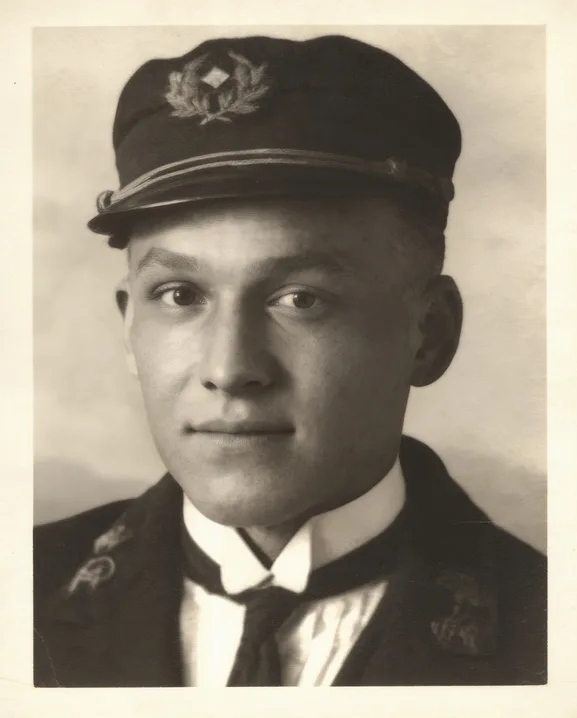 After
After Before
A tintype is a photograph made directly on a thin sheet of lacquered iron, popular from the 1850s into the 1930s. There is no negative; the plate in your hand is the only copy that exists. A quick identity check: a magnet sticks to a tintype, and a daguerreotype shows you a mirror until you tilt it about 45 degrees.
The plate is dark, and its image reads by reflected light, so capture matters more here than for any paper print. Work in soft, even daylight, shoot square-on, and rotate the plate a few degrees at a time until the sheen falls away and the image comes through. Fill the frame, keep the plate edges in shot, and never flex the plate, because the lacquer flakes and takes the image with it. A tintype in its original case stays in the case; photograph it as it sits.
From a good capture, restoration lifts the contrast the dark plate hides, clears scratches and flaked spots, and sharpens what the slow lenses of the era left soft. The physical plate itself is conservator territory, and the damage-by-damage guide covers where that line sits. Every example we publish is graded on our methodology page, failures included.
Three steps from a dark plate to a clear picture. Same on iPhone, Mac, and the web.
Soft, even daylight, square-on. Rotate the plate a few degrees until the sheen falls away and the image reads. Keep the plate edges in the frame.
Pinch and rotate inside the preview to frame the plate, then tap Fix Photo. Contrast lifts, scratches and flaked spots clear, and the soft period lens sharpens.
Drag the slider across the result and check it against your capture. The capture and the plate both stay exactly as they were.
One tap addresses what a century and a half does to a plate.
The murky, low-contrast look of a captured plate opens into a full tonal range while the plate character stays.
Fine scratches and small flaked spots clear the way they do on paper prints, rebuilt from the surrounding image.
The plate's tone stays as captured. Adding lifelike color is a separate tap with Fix & Colorize, best labeled as an interpretation.
Where lacquer took the image with it, the fill is a plausible guess, shown honestly on our methodology page. The physical plate belongs with a conservator.
Yes, from a capture. Photograph the plate in soft light past its sheen and Fix Photo recovers contrast, clears scratches, and sharpens the image. The physical plate itself needs a conservator, and where the lacquer flaked away entirely, the repair fills with a plausible guess.
A magnet sticks to a tintype, because the plate is iron. A daguerreotype is on silvered copper and shows you a mirror until you tilt it about 45 degrees. Daguerreotypes are usually cased and earlier, roughly 1839 to 1864; tintypes run from the 1850s into the 1930s.
Soft, even daylight, no flash, square-on to the plate. Rotate it a few degrees at a time until the reflective sheen falls away and the image reads clearly, then fill the frame with the plate, edges included. Never flex the plate, and leave a cased tintype in its case.
Most tintypes are family treasures rather than market treasures, and the picture matters more than the plate. If yours may be historically significant, have a photograph conservator or appraiser look at the object before any physical handling, and restore from a capture either way.
A tintype has no negative, so the capture you make today is its first backup ever. The example above is an early-1900s portrait from our public test set, restored with one tap.