Capture the photo
Choose it from your camera roll, or photograph the print in soft window light, square-on. Wallet-worn portraits with creases restore too; capture them as they are.
Service portraits and wartime snapshots restore well: fading lifts, creases close, and faces sharpen in one tap. Uniform detail near damage deserves an honest check afterward, and this page covers that too.
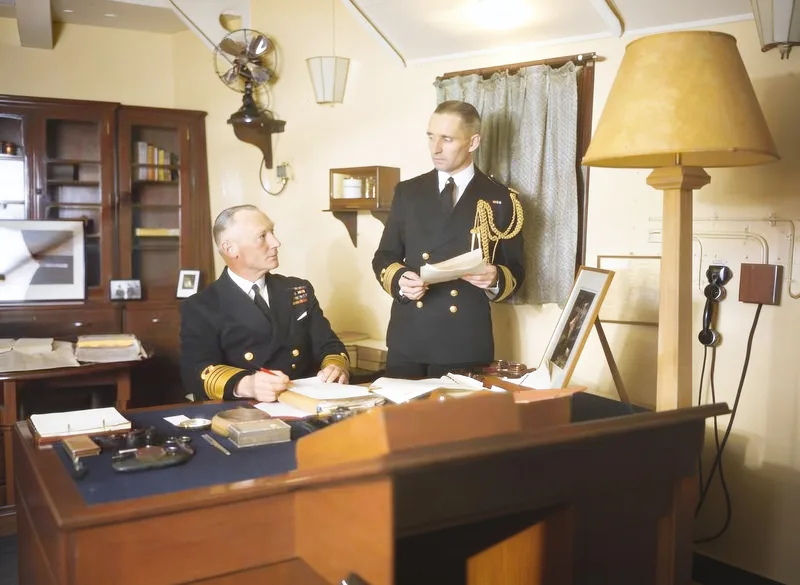 After
After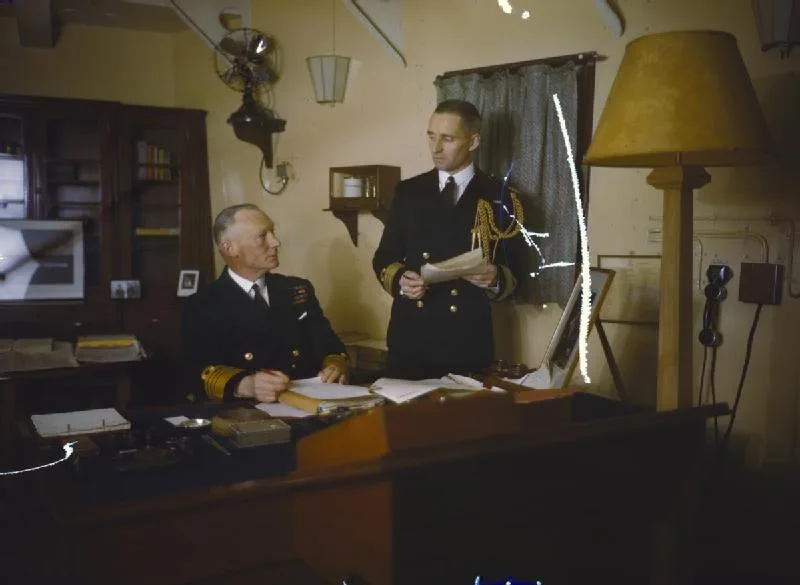 Before
For many families the service portrait is the one formal photograph of a person at that age, taken before a deployment and kept through everything that followed. Restoring one is usually straightforward, because studio portraits were well exposed and printed on decent paper. The damage is age: fading, silvering, creases from wallets and frames.
One part deserves your attention after the repair: the uniform. Insignia, ribbons, and badges carry meaning that generic pattern cannot, and where damage crossed them, the repair fills with what plausibly belongs rather than what the record says. Drag the compare slider and check rank and ribbons against the original before you share the result. Our methodology page shows why we insist on that check.
On colorizing: uniform colors are documented for many services and eras, and the model still guesses rather than looks them up, so treat a colorized service portrait as an interpretation, label it when you share it, and keep the monochrome original as the record. Newspaper clippings of service photos restore too, with the caveat that the printed dot pattern limits how much sharpness is real.
Three steps from a worn portrait to a clean picture. Same on iPhone, Mac, and the web.
Choose it from your camera roll, or photograph the print in soft window light, square-on. Wallet-worn portraits with creases restore too; capture them as they are.
Pinch and rotate inside the preview to frame just the photo, then tap Fix Photo. Fading, creases, and scratches clear while faces and uniform texture sharpen.
Drag the slider and compare insignia, ribbons, and rank against the original before sharing. The original stays untouched either way.
One tap handles what decades in a wallet or frame did.
Faded studio portraits and silvered dark areas come back to a full tonal range, in the original monochrome or color.
Fold lines from wallets and frames close the way tears do, rebuilt from the surrounding image.
Eyes, faces, and fabric texture sharpen with priority, which is what makes a small service portrait enlarge well.
Insignia and medals near damage are filled with plausible pattern, so check them against the original. Our methodology page shows why.
Yes, and usually well, because studio service portraits were properly exposed on decent paper. Fading, creases, scratches, and silvering all repair in one tap, and the restored copy is saved separately so the original file stays untouched.
Where damage crossed them, the fill is plausible pattern rather than the documented record, so compare rank, ribbons, and badges against the original before you share the result. Away from damage they are preserved like the rest of the picture.
Treat colorization as an interpretation. Uniform colors are documented for many services and eras, and the model guesses rather than looks them up, so label a colorized service portrait as colorized and keep the monochrome original as the record.
Yes, with a caveat. Newsprint photos are made of printed dots, and that screening limits how much sharpness is real. Capture the clipping flat in soft light, expect a cleaner but still soft result, and keep expectations modest for small faces.
The example above is a scratched 1942 Royal Navy photograph from our public test set, repaired with one tap. Yours takes about a minute.