Pick the blurry photo
Choose it from your camera roll, or photograph a soft old print. The more the image contains, the more detail the AI can recover.
A blurry print still holds the sharp picture underneath. PicFix pulls detail back into faces and edges in one tap, and the sharper version is ready in seconds. It runs on iPhone and Mac, or in your browser.
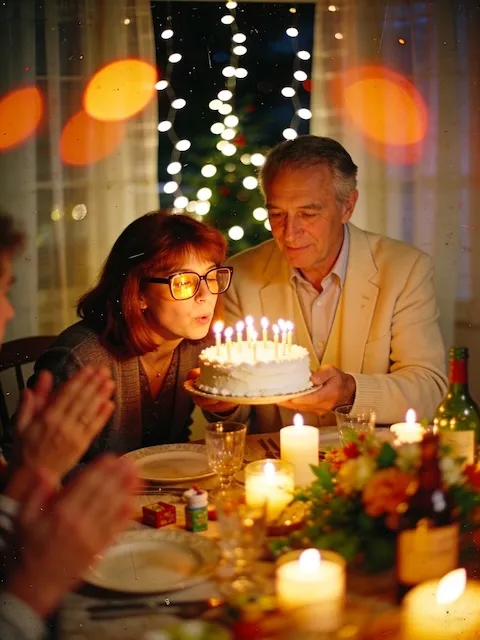 After
After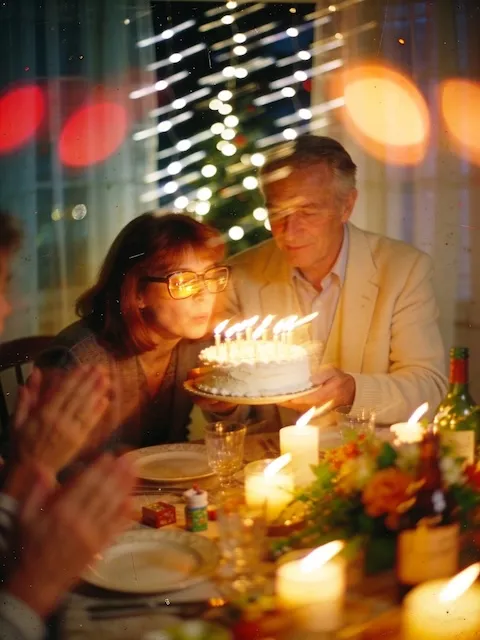 Before
Mild softness has many causes that all repair well: a lens that missed focus by a hair, a print that faded soft, a scan taken through glass. The detail is still in the picture, compressed, and the sharpening pass pulls it back out.
Heavy blur is different, and we say so here rather than in small
print. Where detail was never recorded, sharpening adds crisp edges
to shapes without adding knowledge of what they were. A license
plate that reads as four gray blobs stays unknown, however confident
the result looks.
For the best result, capture the print as large and as sharp as you can: scan it, or photograph it close in good light without digital zoom. The damage-by-damage guide covers where blur sits among the other damage types.
Three steps from a soft, out-of-focus snapshot to a sharper photo. Same on iPhone, Mac, and the web.
Choose it from your camera roll, or photograph a soft old print. The more the image contains, the more detail the AI can recover.
Fix Photo sharpens softened detail, corrects faded lighting, and upscales to a crisp, high-resolution image, keeping the original colors.
The sharpened photo appears alongside the original in a slider. Pull it back and forth to judge the detail that came back, then save the version you prefer.
Honest expectations: AI recovers a lot, but it cannot invent detail that was never captured.
Slightly out-of-focus shots, light motion blur, and the general softening that comes with old prints sharpen up well, with faces and edges regaining definition.
A heavily blurred or very low-resolution photo improves but will not become tack sharp. The AI estimates plausible detail; it cannot recover information that was never there.
Fix Photo also clears scratches and corrects fading in the same tap. Want color on a black and white picture too? Use Fix & Colorize.
Sharpening produces a fresh image rather than overwriting anything. The soft original stays in your library next to the crisp result, so you can always fall back to it.
Open PicFix, pick the blurry photo, and choose Fix Photo. The AI sharpens softened detail, restores lighting, and upscales the result in a few seconds. You can do it on iPhone, Mac, or in your browser.
AI sharpening reconstructs plausible detail from what the image contains, so soft focus, light motion blur, and age-softening improve a lot. Detail that was never captured cannot be invented exactly, so a severely blurred photo improves but will not become tack sharp.
Yes. Fix Photo is a full restoration: it sharpens detail and also clears scratches, corrects faded lighting, and upscales, all in one tap. Choose Fix & Colorize to add natural color as well.
PicFix is free to install. Restorations are sold as credit packs or an optional subscription, and you see the price before anything is charged. Your original photo is never altered.
Bring focus back to a soft old picture in under a minute.