Pick the black and white photo
Choose it from your camera roll, or photograph an old print directly. Even a phone snap of a framed black and white picture works.
The moment in a black and white print happened in color. PicFix puts that color back, natural and true to the era, in one tap. It runs on iPhone and Mac, or right in your browser. Your original is always kept untouched.
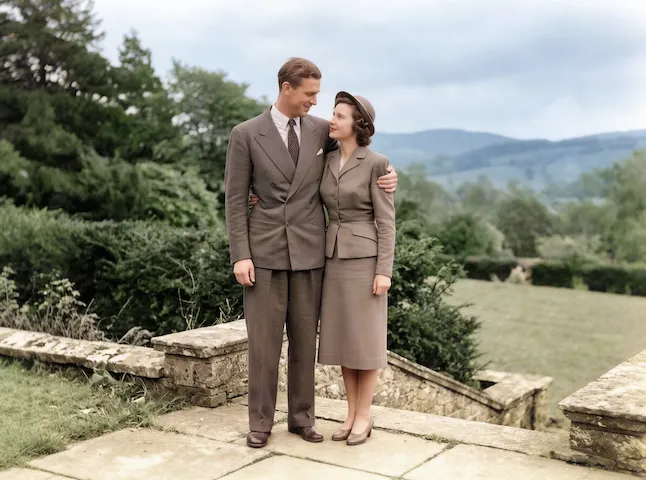 After
After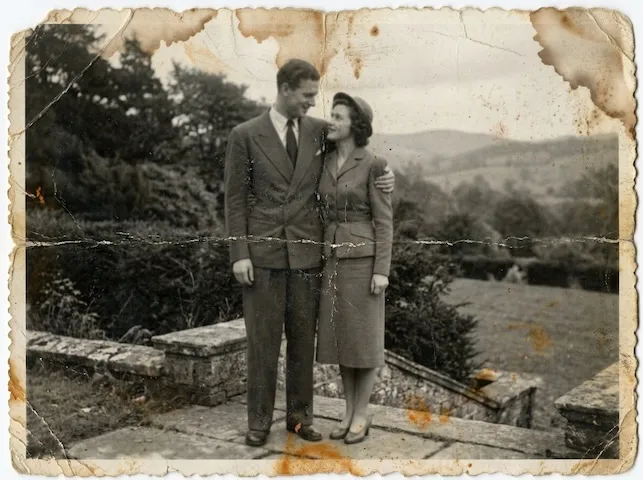 Before
Black and white film recorded brightness and never recorded color, so colorization is inference. The model has seen enough photographs to know that skies, foliage, and skin sit in narrow, predictable ranges, and those land close to truth. The color of a dress, a car, or a front door was written down nowhere, so the model picks something period-plausible.
That distinction matters for family archives. Treat a colorized photo as an interpretation for the mantelpiece, keep the monochrome original as the record, and label the colorized copy as colorized when you share it with relatives. PicFix never alters your original file, so both always exist.
Our methodology page explains how we grade recovery against invention, and the damage-by-damage guide covers what restoration can honestly claim, colors included.
Three steps from a monochrome print to a naturally colored photo you can share. Same on iPhone, Mac, and the web.
Choose it from your camera roll, or photograph an old print directly. Even a phone snap of a framed black and white picture works.
PicFix first restores the photo, clearing scratches and fading, then adds natural color. Prefer to keep it monochrome? Choose Fix Photo instead to only repair damage.
Your colorized photo lands in the gallery with a before and after slider. Slide between the monochrome original and the new color version, then download it or send it to family.
No manual painting, no per-region masks. The AI reads the whole picture and adds color that fits the scene.
Damage is repaired before color is added, so scratches and fading do not get baked into the colorized result. You get a clean, restored, and colored photo in one step.
The model infers plausible color from tone, texture, and context, so faces, skies, and landscapes come out believable rather than flat or tinted.
Adding color never touches your source file. The black and white scan you started with is preserved untouched, and the color version is a separate image you can keep, share, or discard.
Photos are processed on our servers to colorize them, then deleted shortly after. We do not train models on your photos. See the privacy policy.
Open PicFix, pick the black and white photo, and choose Fix & Colorize. The AI restores the picture and adds natural color in a few seconds. You can do it on iPhone, Mac, or in your browser.
AI colorization infers plausible, natural color from tone, texture, and context. Skin, sky, foliage, and common materials come out lifelike. The exact original colors of clothing or rare objects cannot be known from a monochrome image, so they are a best estimate.
Yes. Choose Fix Photo instead of Fix & Colorize. It repairs scratches, fading, and blur while keeping the original black and white tone.
PicFix is free to install. Colorizations are sold as credit packs or an optional subscription, and you see the price before anything is charged. Your original photo is never altered.
Add natural color to a black and white picture in under a minute.